---
title: Pre-Authorisation
description: What is a Pre-Authorisation and how do i configure
---
[Skip to content](https://partners.clenergy-ev.com/knowledge/pre-authorisation-#main-content)
English
Show submenu for translations
[Submit a Ticket](https://partners.clenergy-ev.com/knowledge/kb-tickets/new?hsLang=en)

- [Clenergy EV Admin Portal](https://admin.clenergy.online/)
- [Submit a Ticket](https://partners.clenergy-ev.com/knowledge/kb-tickets/new)
Open main navigation
Close main navigation
- [Clenergy EV Admin Portal](https://admin.clenergy.online/)
- [Submit a Ticket](https://partners.clenergy-ev.com/knowledge/kb-tickets/new)
- English
Show submenu for translations
- [Submit a Ticket](https://partners.clenergy-ev.com/knowledge/kb-tickets/new)
How can we help you?
- There are no suggestions because the search field is empty.
1. [Clenergy EV Knowledge Base](https://partners.clenergy-ev.com/knowledge?hsLang=en)
2. [Clenergy EV Portal](https://partners.clenergy-ev.com/knowledge/clenergy-ev-portal?hsLang=en)
3. [Administration](https://partners.clenergy-ev.com/knowledge/clenergy-ev-portal?hsLang=en#administration)
# Pre-Authorisation
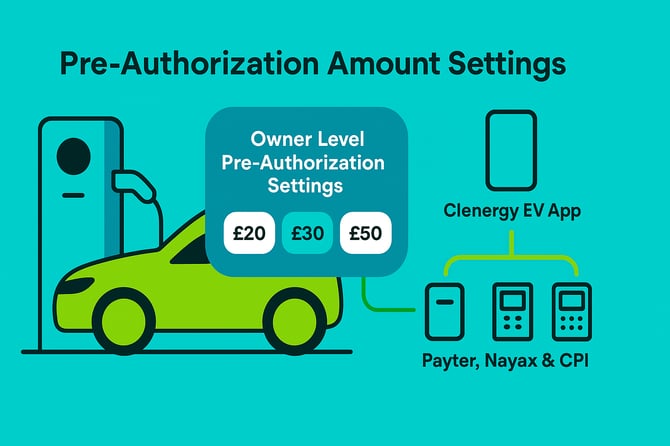
Pre-authorization (pre-auth) is a security feature that temporarily reserves a set amount on a driver's payment method before charging begins. This ensures payment availability and protects both drivers and charge point operators from payment issues.
When a driver starts a Pay-As-You-Go (PAYG) session, the system:
1. **Pre-authorizes** a predetermined amount (e.g., £30)
2. **Calculates** the actual charging cost when the session ends (e.g., £20)
3. **Charges** the actual amount and **releases** the remainder (e.g., £10)
The pre-authorized amount appears as a pending transaction until the final charge is processed and the remainder is released.
#### How Pre-Authorization Works
### Payment Method Compatibility
Pre-authorization works across all Clenergy EV payment methods:
- **Clenergy EV App** (via Stripe integration)
- **Contactless payments** (Payter, Nayax, and CPI terminals)
- **RFID cards** (where payment method is linked)
### Authorization Process
1. Driver initiates charging session
2. System checks payment method validity
3. Pre-authorization hold is placed for the configured amount
4. Charging session begins
5. Upon completion, actual cost is calculated
6. Final amount is charged and excess hold is released
### Hold Release Timeline
- **Successful sessions**: We release as soon as the charger tells us the session is over - typically immediately, but could be delayed by the charger. Final processing depends on your bank
- **Failed sessions**: Released within 30 minutes. This is processed as a cancellation rather than a partial refund, so banks typically handle this instantly
- **Banking variations**: Some banks may take longer depending on their policies
#### Configuration Options
### Owner-Level Settings
Set default pre-authorization amounts that apply across your entire network:
**Recommended amounts:**
- **£20**: Suitable for slower AC charging (up to 22kW) in urban locations
- **£30**: Standard for mixed AC/DC networks (default recommendation)
- **£40**: High-power DC charging or premium locations
- **£50**: Ultra-fast charging (150kW+) or highway services
**Maximum Amount:**
There is not a maximum pre-authorisation amount, but a sensible amount is encouraged.
### Tariff-Level Override
You can override the owner-level setting for specific tariffs:
- Higher amounts for premium or rapid charging tariffs
- Lower amounts for employee or resident charging programs
- Dynamic amounts based on time-of-use pricing
### Configuration Hierarchy
Settings follow this priority order:
1. **Tariff-level** (highest priority)
2. **Owner-level** (default fallback)
#### Best Practices
### Setting Appropriate Amounts
**Consider charging speed and duration:**
- AC charging (3-22kW): £20-30 for typical 2-8 hour sessions
- Fast DC (50-100kW): £30-40 for 30-45 minute sessions
- Ultra-rapid DC (150kW+): £40-50 for 10-30 minute sessions
**Factor in location type:**
- **Workplace**: Lower amounts (£20-25) for familiar users
- **Public destinations**: Standard amounts (£25-35)
- **Highway services**: Higher amounts (£35-50) for rapid turnover
**Account for electricity pricing:**
- Higher pre-auth during peak rate periods
- Consider local electricity costs in your region
### Customer Communication
**Clear signage should include:**
- Pre-authorization amount displayed prominently
- Explanation that excess amounts will be released
- Estimated release timeframe
- Contact information for payment queries
**App and notifications:**
- Real-time updates on pre-auth and final charges
- Clear distinction between pending and final amounts
- Automated notifications when holds are released
#### Troubleshooting Common Issues
### Failed Pre-Authorization
**Possible causes:**
- Insufficient funds on payment method
- Card/account restrictions or blocks
- Expired payment method
- Network connectivity issues
**Resolution steps:**
1. Verify payment method validity
2. Check available balance/credit limit
3. Try alternative payment method
4. Contact payment provider if issues persist
### Customer Complaints About Holds
**Common scenarios:**
- Multiple holds appearing for same session
- Holds not releasing promptly
- Confusion about pending vs. final charges
**Response approach:**
1. Explain the pre-authorization process clearly
2. Provide specific timeline for hold release
3. Offer to check session details in your system
4. Escalate to payment processor if necessary
### Stuck or Duplicate Holds
**Investigation steps:**
1. Check session logs for completion status
2. Verify with payment processor
3. Manually release holds if system allows
4. Process refund if duplicate charges occurred
#### Regional Considerations
### UK Banking Practices
UK banks typically process pre-authorization holds and releases as follows:
- **Debit cards**: Holds usually appear immediately, releases processed within 1-3 business days
- **Credit cards**: May take slightly longer for final settlement, up to 5 business days in some cases
- **Cancellations**: Most UK banks process authorization cancellations instantly or within hours
- **Business cards**: Corporate payment cards may have different processing timelines
### Customer Expectations in the UK Market
- UK drivers generally understand contactless payment holds but may be less familiar with EV charging pre-authorization
- Clear communication about temporary holds is essential to prevent payment disputes
- Consider peak charging times around bank holidays when processing may be delayed
#### Monitoring and Optimization
### Key Metrics to Track
- **Authorization success rate**: Should be \>95%
- **Average session value vs. pre-auth amount**: Optimize for minimal overhang
- **Customer complaints**: Monitor for pre-auth related issues
- **Hold release performance**: Track actual vs. expected release times
### Regular Review Process
1. **Monthly analysis** of average session values vs. pre-auth amounts
2. **Quarterly review** of customer feedback and complaints
3. **Annual assessment** of regional banking changes or regulations
4. **Immediate adjustments** following significant pricing changes
#### Technical Configuration
### Via Clenergy EV Portal
1. Navigate to **Administration → CPO → Finance**
2. Select **CPO Level Pre-Authorization**
3. Choose desired amount from preset options (£20, £30, £40, £50)
4. Save configuration
### Tariff-Specific Settings
1. Go to **Administration** **→ Owners → Tariffs → Select Tariff → Advanced Settings**
2. Toggle **Override Owner Pre-Auth Setting**
3. Select appropriate amount for this tariff
4. Apply changes
#### Support and Contact
For technical issues with pre-authorization configuration:
- **Support Portal**: Submit ticket with session details
- **Phone Support**: +44 (0) 3330 129095
- **Email**: support@clenergy-ev.com
- [Hardware](https://partners.clenergy-ev.com/knowledge/hardware?hsLang=en#main-content)
- [Energy Monitors](https://partners.clenergy-ev.com/knowledge/hardware?hsLang=en#energy-monitors)
- [Onboarding Info](https://partners.clenergy-ev.com/knowledge/hardware?hsLang=en#onboarding-info)
- [Clenergy EV Portal](https://partners.clenergy-ev.com/knowledge/clenergy-ev-portal?hsLang=en#main-content)
- [Administration](https://partners.clenergy-ev.com/knowledge/clenergy-ev-portal?hsLang=en#administration)
- [Issue Troubleshooting](https://partners.clenergy-ev.com/knowledge/clenergy-ev-portal?hsLang=en#issue-troubleshooting)
- [Network](https://partners.clenergy-ev.com/knowledge/clenergy-ev-portal?hsLang=en#network)
- [Back Office](https://partners.clenergy-ev.com/knowledge/clenergy-ev-portal?hsLang=en#back-office)
- [Driver Support](https://partners.clenergy-ev.com/knowledge/driver-support?hsLang=en#main-content)
- [Top 3 Issues](https://partners.clenergy-ev.com/knowledge/driver-support?hsLang=en#top-3-issues)
- [Accounts](https://partners.clenergy-ev.com/knowledge/driver-support?hsLang=en#accounts)
- [App](https://partners.clenergy-ev.com/knowledge/driver-support?hsLang=en#app)
- [Receipts and Payments](https://partners.clenergy-ev.com/knowledge/driver-support?hsLang=en#receipts-and-payments)
- [Charger Cable Stuck](https://partners.clenergy-ev.com/knowledge/driver-support?hsLang=en#charger-cable-stuck)
- [Charging](https://partners.clenergy-ev.com/knowledge/driver-support?hsLang=en#charging)
- [Private Charge Point](https://partners.clenergy-ev.com/knowledge/driver-support?hsLang=en#private-charge-point)
- [Home Charging](https://partners.clenergy-ev.com/knowledge/driver-support?hsLang=en#home-charging)
- [How to Start a Charge Guides](https://partners.clenergy-ev.com/knowledge/driver-support?hsLang=en#how-to-start-a-charge-guides)
- [Other](https://partners.clenergy-ev.com/knowledge/driver-support?hsLang=en#other)
- [RFID Cards](https://partners.clenergy-ev.com/knowledge/driver-support?hsLang=en#rfid-cards)
- [Other](https://partners.clenergy-ev.com/knowledge/other?hsLang=en)
- [Glossary](https://partners.clenergy-ev.com/knowledge/glossary?hsLang=en)
# Clenergy EV
24/7 Driver Support: [+44 (0) 800 047 8082](tel:+4403330129095)
[mailto:email@email.com](mailto:email@email.com)
Copyright © 2025, Clenergy EV